
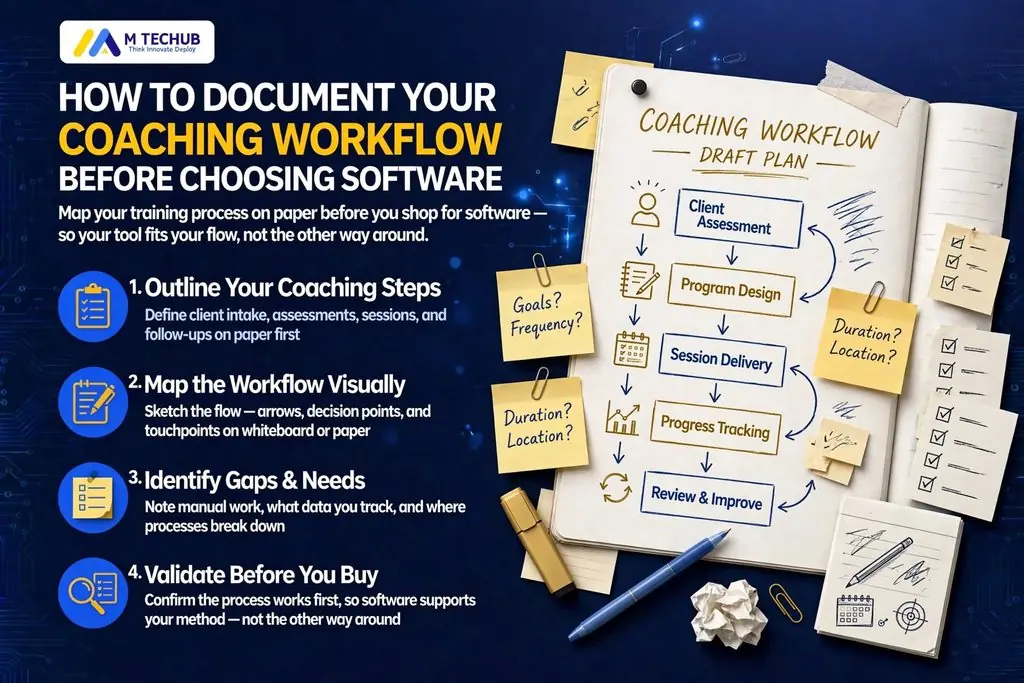
Choosing coaching software before understanding your processes can leave you paying for features you rarely use while important tasks still happen manually.
Coaching workflow documentation records how your business handles inquiries, discovery calls, proposals, onboarding, sessions, payments, and renewals. It identifies the responsible person, required information, decisions, and completion conditions for each activity.
Start by documenting one coaching service. Then use that workflow to identify problems and decide what software needs to do.
TL;DR
- Map your current coaching client journey before comparing platforms.
- Record responsibilities, triggers, information, exceptions, and outcomes.
- Turn recurring problems into testable software requirements.
- Compare tools against your workflow, client experience, privacy needs, budget, and implementation effort.
What Coaching Workflow Documentation Means
Coaching workflow documentation explains how work moves through your practice.
A useful record includes the event that starts a task, the responsible person, required information, tools, decision rules, and expected outcome.
A to-do list might say, “Send onboarding email.” A documented process explains when that email should be sent and what must happen first.
Example
After the agreement is signed and the required initial payment is confirmed, the administrator sends the welcome email and intake form. The assigned coach reviews the completed intake before releasing the first-session booking invitation.
Keep your current process separate from your proposed improvements. This makes it clear what happens today and what you intend to change.
Why Document Before Choosing Software?
A feature list cannot tell you whether a platform fits your business unless you understand the work it needs to support.
A solo life coach may need booking, payment tracking, and private client records. An executive coaching team may also need coach assignment, organizational purchasing, and separate access for administrators.
Documentation makes those differences visible.
It also helps distinguish a software limitation from an operating problem. If nobody is responsible for reviewing new inquiries, buying a CRM will not resolve that responsibility gap by itself.
How Much Time Should You Set Aside?
For a straightforward service, set aside two to three hours for an initial draft and review. This is a planning allowance; the actual time depends on your workflow and the records available.
A practical working session could look like this:
| Activity | Suggested allowance |
|---|---|
| Select the service and review recent records | 20 minutes |
| List stages, tasks, and responsibilities | 40 minutes |
| Record decisions, tools, and exceptions | 40 minutes |
| Validate the map and prioritize improvements | 30–60 minutes |
| Total | 130–160 minutes |
A team practice, several service types, or organizational purchasing may require additional sessions.
Coaching Workflow Documentation in Eight Steps
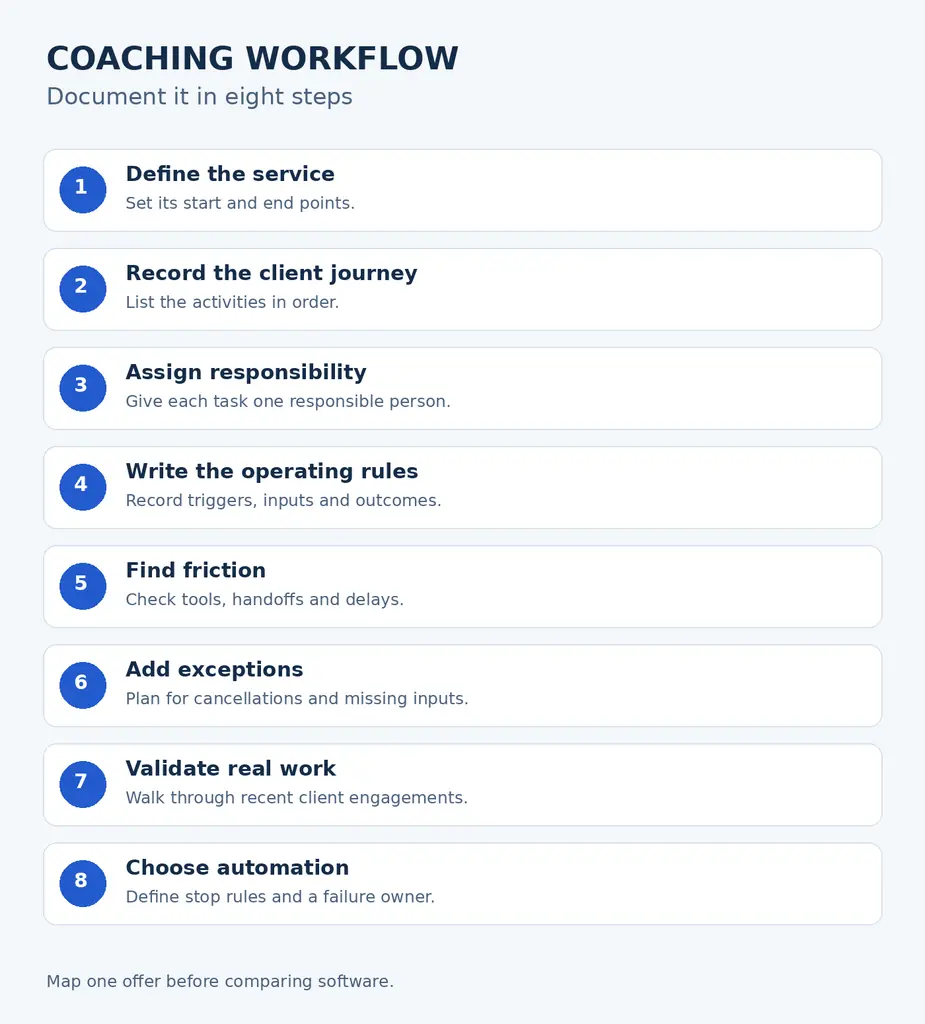
Define the Service and Workflow Boundaries
Choose one offer: a six-session package, monthly coaching, a mentoring program, or a course with individual support.
Specify where its process starts and ends.
Example: This workflow starts when a prospect submits an inquiry and ends when the package is renewed or the engagement is closed.
For a solo coach: Start with your most frequently delivered service.
For a team: Agree which service, purchasing route, and team roles the map covers.
Record the Coaching Client Journey
List the stages in their actual order:
Inquiry → discovery → proposal → agreement → payment → intake → scheduling → sessions → progress review → renewal or offboarding.
Check recent emails, invoices, calendars, and task records rather than relying entirely on memory.
Document the work between sessions too, including preparation, agreed actions, and follow-ups.
For a solo coach: Include tasks you perform informally, such as checking payment before sending a booking link.
For a team: Identify where work passes between sales, administration, and the coach.
Assign a Responsible Person
Use one consistent label: Responsible person.
Assign one person or clearly defined role to each task. Record backup arrangements where needed.
Example: The administrator monitors unanswered proposals. The assigned coach decides whether a prospect’s goals fit the service.
For a solo coach: You can hold every responsibility, but distinguish administrative work from coaching delivery.
For a team: Avoid shared labels such as “everyone.” Identify who checks that the task is completed.
Record Triggers, Information, Decisions, and Outcomes
For each activity, answer:
- What starts it?
- What information is needed?
- What decision changes the next step?
- What proves it is complete?
For example:
- Task: Send proposal.
- Trigger: Discovery call completed with a decision to offer coaching.
- Information: Client goals, package, fee, purchasing contact, and proposed start date.
- Outcome: Correct proposal sent, with an expiry date and follow-up task recorded.
“Invoice sent” and “payment confirmed” are different outcomes. Document them separately.
For a solo coach: Write rules clearly enough that you could follow them after a busy week away.
For a team: Specify which conditions authorize the next person to act.
Identify Tools, Handoffs, and Delays
Record where each activity happens today: inbox, calendar, spreadsheet, form tool, accounting system, or client platform.
Then follow the information between those tools.
Look for repeated entry, missing updates, and tasks waiting for someone to notice them.
For a solo coach: Check how often you switch tools or search for client information.
For a team: Check whether the receiving person gets the information needed to continue.
Document Exceptions
Include the problems your practice has encountered or reasonably needs to handle.
Examples include an unsigned agreement, failed payment, incomplete intake, cancellation, coach absence, or organizational purchase approval.
Give each exception a next action and a responsible person.
Example follow-up rule: Send reminders on days 3, 7, and 10 while the stage remains pending. After three unanswered reminders, stop automatic messages and create an administrator review task.
This is an example operating rule, not a universal recommendation. Adapt timing to your service, terms, and client communications.
For a solo coach: Create a review task so unresolved cases do not disappear into your inbox.
For a team: Define who can approve exceptions such as an alternative payment arrangement.
Validate Against Real Engagements
Walk through one recent standard engagement and one that involved a problem.
Check whether the map explains what happened, including informal approvals and missing information.
The ASQ flowchart guide recommends checking process maps with the people involved and walking through the process to confirm accuracy.
For a solo coach: Compare the document with actual client records.
For a team: Ask each responsible person to review their tasks and handoffs.
Identify Suitable Automation
Start with predictable administrative tasks, such as confirmations, reminders, and internal task creation.
Write the trigger, stop condition, and failure response before configuring anything.
Send an intake reminder only when the engagement is active and the form is incomplete. Stop on completion or closure. After the agreed reminder limit, assign a review task.
For a solo coach: Automate repetitive administration while retaining review of client-specific decisions.
For a team: Give each automation a responsible person who monitors failures and exceptions.
How to Map Your Coaching Process
Turn your written steps into a map showing actions, decisions, and handoffs.
Use short labels such as “Review inquiry” and clear questions such as “Proposal accepted?”
Keep detailed instructions in the supporting document so the map remains readable.
Coaching Client Onboarding Process Flowchart
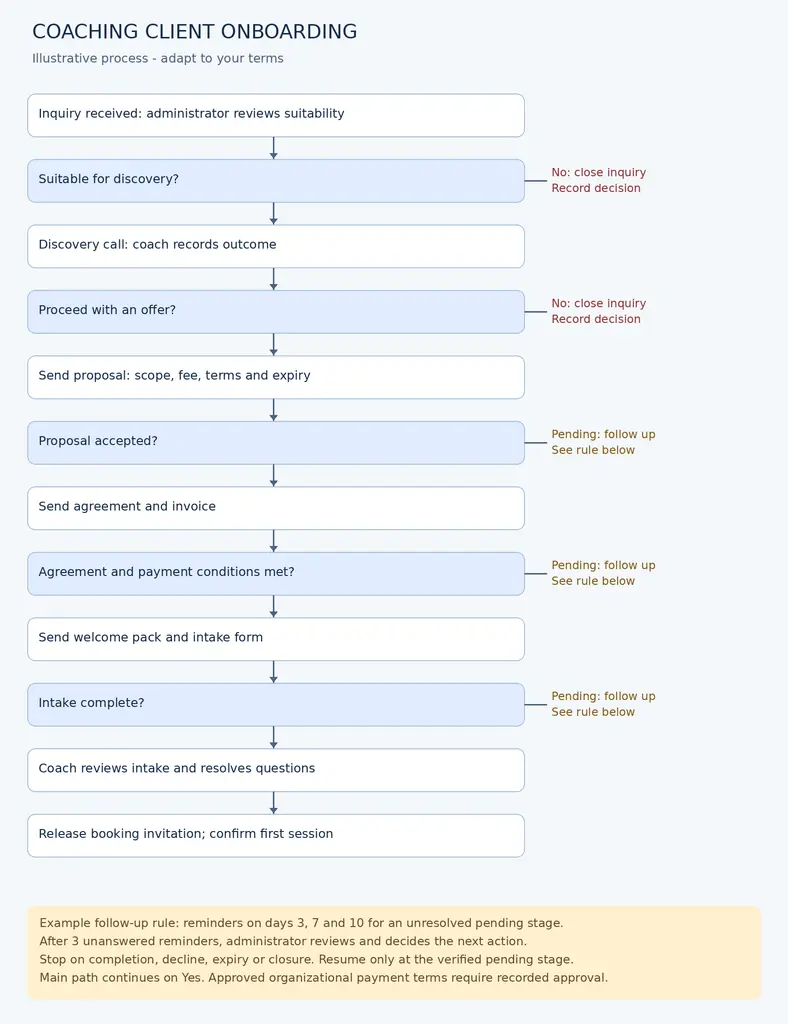
The main route is:
- Review inquiry: If unsuitable, record the decision and close.
- Hold discovery call: Decide whether to send a proposal or close.
- Send proposal: Record acceptance, decline, expiry, or pending status.
- Send agreement and invoice: Check the required conditions.
- Send welcome materials and intake: Monitor completion.
- Review intake: Resolve questions before releasing booking.
- Confirm first session: Begin the ongoing coaching workflow.
For pending stages, apply the documented reminder limit. After escalation, the responsible person decides whether to resume, extend, or close the case.
Stop automatic onboarding messages when a client declines or the engagement closes.
Copyable Coaching Workflow Template
Use one row per activity. The following sample covers onboarding; extend it through sessions, reviews, renewal, and closure.
| Workflow stage | Trigger | Task or action | Responsible person | Information required | Tool currently used | Problem or bottleneck | Desired outcome | Automation potential |
|---|---|---|---|---|---|---|---|---|
| Inquiry | Website inquiry arrives | Review suitability and assign next action | Administrator | Contact details, requested service, goals | Shared inbox | Inquiry has no follow-up date | Status and next action recorded | Acknowledgment and task creation |
| Discovery | Suitable prospect books | Hold call and record offer/close decision | Coach | Inquiry and discovery notes | Calendar and client record | Outcome stays in personal notes | Clear decision available to administrator | Reminder and post-call task |
| Proposal | Coach approves offer | Send package proposal | Administrator | Scope, fee, start date, purchasing contact | Document tool and email | Incorrect package version sent | Correct proposal and expiry recorded | Approved template; bounded reminders |
| Agreement | Proposal accepted | Send agreement and track signature | Administrator | Accepted proposal and client details | Signing tool | Signature status checked manually | Signed agreement stored correctly | Status update and follow-up |
| Payment | Invoice becomes due | Confirm payment or approved terms | Administrator | Invoice reference and payment status | Accounting system | Receipt not linked to engagement | Onboarding condition confirmed | Supported payment-status update |
| Intake | Onboarding conditions met | Send form and track completion | Administrator | Client reference and service type | Form tool | Missing responses discovered late | Intake ready for review | Conditional reminders |
| Preparation | Intake completed | Review responses and resolve questions | Assigned coach | Intake and agreed goals | Restricted client record | Review task not assigned | Client ready for booking | Task creation; human review |
| Scheduling | Coach confirms readiness | Release first-session booking | Administrator | Coach, session length, availability | Booking tool | Wrong calendar offered | Correct appointment confirmed | Booking invitation and confirmation |
For each task, also record exceptions, reminder limits, access restrictions, and a testable completion condition.
Example: A Six-Session Executive Coaching Package
Illustrative example—not a client case study or measured result.
Consider a small practice offering six individual executive coaching sessions.
Before documentation, the coach handles discovery, an administrator sends documents, and both assume the other person checks intake readiness.
| Area | Before documentation | Proposed workflow after documentation |
|---|---|---|
| Discovery outcome | Notes remain in the coach’s inbox | Coach records “send proposal” or “close” |
| Proposal | Administrator reconstructs the offer from emails | Approved package details trigger proposal preparation |
| Onboarding | Booking link sent after verbal acceptance | Agreement and payment conditions checked first |
| Intake | Coach checks shortly before the session | Completion creates a preparation task |
| Session tracking | Appointments counted manually | Each completed session updates the package record |
| Renewal | Discussion happens when someone remembers | Review task created after session five |
| Exceptions | Repeated reminders continue without a decision | Three-reminder limit followed by human review |
The exercise produces specific requirements: proposal status, onboarding conditions, intake tasks, session counts, and renewal triggers.
It does not prove that the practice needs custom fitness software. These requirements become the basis for testing existing tools first.
Common Coaching Workflow Problems to Identify
Look for evidence in your own work rather than assuming every problem applies.
| Problem | Practical example | First action |
|---|---|---|
| Duplicated entry | Client details copied into a form, spreadsheet, and invoice | Identify the primary record |
| Missed follow-up | Proposal has no next-action date | Assign responsibility and a date |
| Scheduling confusion | Client receives the wrong coach’s calendar | Define booking rules |
| Payment delays | Nobody checks whether an invoice was paid | Assign a payment checkpoint |
| Inconsistent onboarding | Two clients receive different welcome instructions | Approve a standard sequence |
| Fragmented records | Session actions sit in several personal documents | Define storage and access |
| Unclear renewal timing | Package ends without a review | Set a review trigger |
Turn Coaching Workflow Documentation Into Software Requirements
Describe the outcome you need, then explain how you will test it.
“Needs reminders” is too broad.
The system must identify incomplete intake forms, send reminders under the agreed rules, stop messages when the engagement closes, and create a review task after the reminder limit.
Prioritize requirements as must-have, useful, or unnecessary for now.
| Operational need | Requirement | Acceptance check |
|---|---|---|
| Several coaches share administration | Permissions match responsibilities | Test administrator and coach accounts |
| Intake precedes preparation | Incomplete intake is visible | Submit an incomplete test case |
| Payments affect onboarding | Payment conditions control progression | Test paid, unpaid, and approved exception cases |
| Packages contain six sessions | Remaining sessions are traceable | Complete, cancel, and reschedule test appointments |
| Practice may change platforms | Relevant records can be exported | Inspect a sample export |
| Staff need oversight | Reports show unresolved tasks | Find an overdue proposal and incomplete intake |
If scope remains unclear, software consulting services can help translate workflows into requirements before implementation.
Understand the Main Coaching Software Categories
These are categories to evaluate, not capabilities guaranteed in every product.
| Category | Typical purpose | What to verify |
|---|---|---|
| All-in-one coaching platforms | Combine several client and practice functions | Whether your exact service and exceptions fit |
| Booking tools | Availability, appointments, and scheduling messages | Time zones, buffers, rescheduling, coach assignment |
| CRM systems | Inquiries, contacts, proposals, and follow-ups | Pipeline visibility and next-action ownership |
| Form tools | Intake, questionnaires, and feedback | Access, storage, conditional questions, exports |
| Accounting tools | Invoices, payment records, and financial administration | Purchasing arrangements and accountant requirements |
| Document and signing tools | Proposals, agreements, and signatures | Versions, status tracking, and retrieval |
| Learning platforms | Course materials and learning activities | Cohort access and connection to coaching sessions |
A focused combination of tools may fit a simple practice. An integrated platform may reduce handoffs if it supports your requirements.
Where separate tools must exchange information, assess system integration services only after defining what data should move and why.
Choosing Coaching Software Against Your Workflow
Give each shortlisted tool the same test.
Run a fictional client through discovery, proposal, agreement, payment, intake, booking, follow-up, and closure. Then test a failure or exception.
Confirm:
- Every must-have requirement works on the proposed plan.
- Responsibilities and permissions match your practice.
- Clients can complete essential tasks on a phone.
- Required integrations work with your actual setup.
- Failed actions become visible to a responsible person.
- Relevant records export in a usable format.
- Subscription, setup, migration, and training costs are understood.
- Remaining gaps have acceptable workarounds.
Keep must-have failures separate from optional-feature scores. A platform should not win simply because it has more features.
Include Privacy in Your Coaching Workflow
Client records may contain personal goals, workplace concerns, relationship information, or health-related disclosures.
For each stage, record what information is collected, why it is needed, who can access it, where it goes, and when it should be reviewed or deleted.
For UK practices, the ICO’s data protection principles cover matters including lawful processing, data minimization, storage limitation, security, and accountability.
For US businesses, the FTC’s guide to protecting personal information provides practical guidance on inventorying information, limiting retention, protecting records, and secure disposal.
Apply those considerations to actual tasks:
- Keep private session notes separate from administrative appointment details.
- Specify what an organizational sponsor may receive.
- Use fictional information in software trials.
- Document access removal when a team member leaves.
- Check vendor terms and arrangements against applicable requirements.
Specific legal obligations depend on your activities, information, and jurisdiction. Selecting a platform alone does not establish compliance.
Common Software Selection Mistakes
Choosing Because Another Coach Uses It
A solo mentor recommends a platform, but your practice needs several coaches and organizational purchasers.
Better approach: Test your own purchasing and delivery routes.
Paying for Unused Features
A coach purchases course hosting and community features despite currently selling only individual sessions.
Better approach: Separate current requirements from possible future offers.
Automating an Unclear Process
A welcome sequence starts when a proposal is sent rather than accepted.
Better approach: Define the correct trigger and onboarding conditions first.
Ignoring the Client Experience
The administrator likes the dashboard, but clients must create several accounts to complete onboarding.
Better approach: Test the complete journey from the client’s perspective.
Skipping Migration and Training
Contact details transfer successfully, but package balances and document links do not.
Better approach: Test a small migration sample and assign someone to check the results before switching.